I wanted to use vmotion using virtual connect by selecting “Private Network”. We planned to use VC switch itself for the vmotion and not going beyond. But looks like it we can not achieve it and we have to use traditional way of VLAN tagging . I will talk about how to use VST in my next blog.
Wednesday, February 24, 2010


Wednesday, February 17, 2010
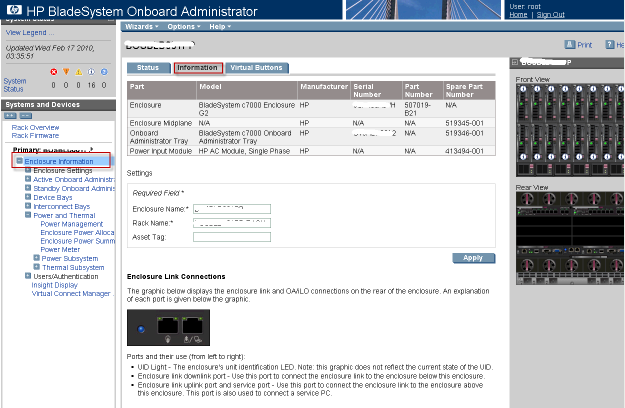
Working with Blade-1:Changing name of the Enclosure and Rack Name
Changing name of the Enclosure and Rack Name:
1. Login to Onboard administrator with user name and password
2. Go to Enclosure Information – Information
Thursday, February 11, 2010
Is Google gmail running VMware virtual machine ?
Yes I am back after a long time and the obvious reason. I wanted to share something , I was browsing my gmail and guess what happened. Google was running on VMware virtual machine . You don’t believe it ? See below ..

Saturday, January 9, 2010
I lost My Dear Friend on 8th Jan
On 8th of Jan 2010 at 8AM in the morning I got a call from my friend and conversation goes like this
Vinod: Hey Vikash I am Vasu friend do you remember?
Vikash : Of course I do.
Vinod : I have some bad news to share… Vasu is no more ?
Vikash: Hey are you serious ? Tell me you are joking?
Vinod: No it happened early morning.
In this tragic accident we lost three friend and 2 were injured.

We had spend good time of ours together but now it end something like this
Oh heart, if one should say to you that the soul perishes like the body, answer that the flower withers, but the seed remains. GOD will provide all the helping hand to your family and will give them strength to overcome this tragic moment.

This was the last conversation happened with me over GTALK and I missed calling him over 9902622777

Wednesday, December 16, 2009
The Parent Virtual Disk has been modified since child was created for VMware Workstation
Few months back I wrote blog about “The Parent Virtual Disk has been modified since child was created” . This blog talks about how we do it on virtual machine which runs from ESX host. One of the user from Norway wrote nice comments about VM running on VMware workstation. I decided to write it as my blog. Thanks Schotterbeck.
HOW TO for Windows and VMware Workstation:
Using this article as a baseline, instead of "grep" use this CMD command: find "CID" "x:\folder\base-file.vmdk"
Use CTRL+C to abort the listing after the first few lines.
Take note of the CID=xxxxxxxx
If not already done so, download and install HEX EDIT FREE (I used v.3.0f)
NOTE: Since the vmdk-files can contain both CID and the whole disk file, they are both fragile AND HUGE! Take special caution when editing these files. A backup copy should always be taken and made write protected!!
This is also the reason why you need a special editor (like HEX edit) to edit the file the right way.
When ready, start hex edit and open the first snapshot file (ex. base-file-000001.vmdk)
Find the "parent=" string in the ascii section of the editor and place the cursor in front of the first letter. Start typing the CID from the base-file.
If prompted, say YES to disable write protection BUT NO to disable Replace mode. This is important to keep the file exactly the way it was, only changing the CID value.
Repeat/Apply this process to other . vmdk files in your chain, if other snapshot files in the middle of the chain has been opened.
Good luck people with all your restores.
And PLEASE VMware, make your programs start doing a check on this, when mounting a new hard drive file! ;)
HOW TO for Windows and VMware Workstation:
Using this article as a baseline, instead of "grep" use this CMD command: find "CID" "x:\folder\base-file.vmdk"
Use CTRL+C to abort the listing after the first few lines.
Take note of the CID=xxxxxxxx
If not already done so, download and install HEX EDIT FREE (I used v.3.0f)
NOTE: Since the vmdk-files can contain both CID and the whole disk file, they are both fragile AND HUGE! Take special caution when editing these files. A backup copy should always be taken and made write protected!!
This is also the reason why you need a special editor (like HEX edit) to edit the file the right way.
When ready, start hex edit and open the first snapshot file (ex. base-file-000001.vmdk)
Find the "parent=" string in the ascii section of the editor and place the cursor in front of the first letter. Start typing the CID from the base-file.
If prompted, say YES to disable write protection BUT NO to disable Replace mode. This is important to keep the file exactly the way it was, only changing the CID value.
Repeat/Apply this process to other . vmdk files in your chain, if other snapshot files in the middle of the chain has been opened.
Good luck people with all your restores.
And PLEASE VMware, make your programs start doing a check on this, when mounting a new hard drive file! ;)
Subscribe to:
Posts (Atom)


 Posts
Posts



