Wednesday, March 3, 2010

Working with Blade6:The same network cannot be on multiple Flex-10 ports within the same profile

Under your server profile  , you cannot have more than 2 flex 10 NIC dedicated to same network profile. If you tried to assign

If you refer the document on Page 13 ,its clearly mentioned . If you need separate pairs of NICs to go to the same network you can attach additional network cables to the Flex 10 module and configure each uplink port as its own network.

Scenario is like this and I was trying
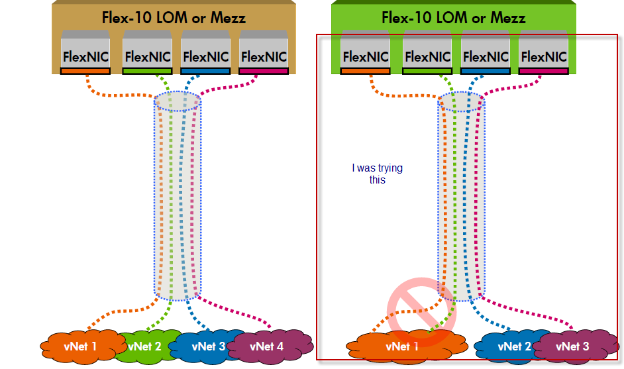
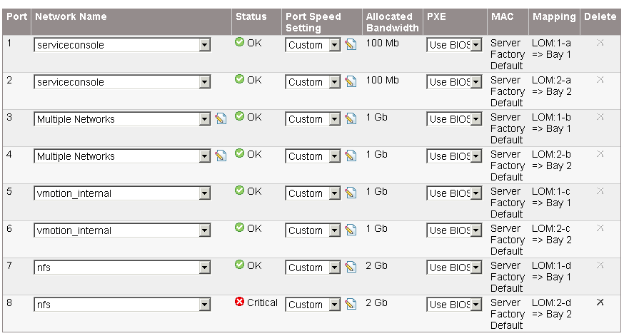
So you have two LOM (Lan on Motherboard ) for each Blade server ,which is also called as Flex NIC. Refering to above figure what we are doing is putting VLAN NFS on LOM1 which as per limitation of Flex 10 is not supported.

I will talk more about Flex 10 NIC architect in my next blog but the document which I mention above is very nice.
Tuesday, March 2, 2010

vSphare : The license Key entered does not have enough capacity for this entity

I was trying to license my vSphare ESX host using my upgrade subscription and I was getting message


I then checked my CPU on my blade server and it has 16CPU

Then I checked my license portal and it was assigned for 2 CPU for two different subscription upgrade.

I combined get to get total of 4 CPU which will be 16 logical CPU .

It will then generate new license Key for 4 CPU

You enter this new Key and then you are good to go

Finally your ESX host is licensed


Working with Blade5: Blade name does not appear while Profile assignment

When you assign serer profile to the blade it does not say that it has assigned  following server to the following profile rather it says Bay1/2 …

It would have become easy if it would have update blade name

Event ID 7024: VMware VirtualCenter Server service terminated with service-specific error 2 (0x2)

Event Type: Error

Event Source: Service Control Manager

Event Category: None

Event ID: 7024

Date: 3/2/2010

Time: 2:33:37 AM

User: N/A

Computer: ABCDD

Description:

The VMware VirtualCenter Server service terminated with service-specific error 2 (0x2).

This was the error which I was getting whenever I tried to start "VMware VirtualCenter Server".

  1. I checked SQL ODBC connection and that was running fine.
  2. I tried playing with license server thinking that license might have caused this but no success.
  3. I then checked SQL for following error

Event Type: Failure Audit

Event Source: MSSQLSERVER

Event Category: (4)

Event ID: 18456

Date: 3/1/2010

Time: 9:00:00 AM

User: NT AUTHORITY\SYSTEM

Computer: ABCDDDD

Description:

Login failed for user 'NT AUTHORITY\SYSTEM'. [CLIENT: <local machine>]

This one also fixed but still I was not able to start services. Finally I stopped IIS service on VC box and then tried to start VC service this worked .

Source and credit : Google and this link

Friday, February 26, 2010

Working with Blade4:Does VC support LACP ?

Does Virtual Connect support EtherChannel\802.3ad\SLB on the downlinks to the server NICs? Can I use LACP port trunking on the server NICs connected to Virtual Connect?

No, Virtual Connect does not support EtherChannel\802.3ad on the downlinks to server NIC ports.
