Wednesday, March 17, 2010

VI3 hosts cannot be added if vCenter is licensed but License Server is not Configured

I had thought of playing with VC4.0 /ESX3.5/4.0 . I had VC4.0 and then from my VC2.5 I disconnect one ESX host and was trying to connect my VC4.0 . It was giving me error

I then checked license and found that it was added with IP address. I then added another VI3 license server using FQDN and then I was able to add ESX host into VC4.0

Tuesday, March 9, 2010

VMkernel capacity view released

Today I got an update

that Capacity View has been released. Capacity View is a free server and storage capacity management tool for VMware admins that helps you quickly identify and diagnose:

· Capacity related performance issues like:

o High VM I/O latency

o Under allocated memory, CPU and storage

· How many VM “slots” are available for new VMs

· VMs with over-provisioned memory, CPU and storage

Capacity View

Capacity View is a small, easy to use tool that provides VMware performance and capacity diagnostics. Download now and be up and running in 3 minutes

Friday, March 5, 2010

Working with Blade7:Integrating Onboard Administrator and Virtual Connect Manger with AD

1. Make sure  you define access level and create e AD security group accordingly.

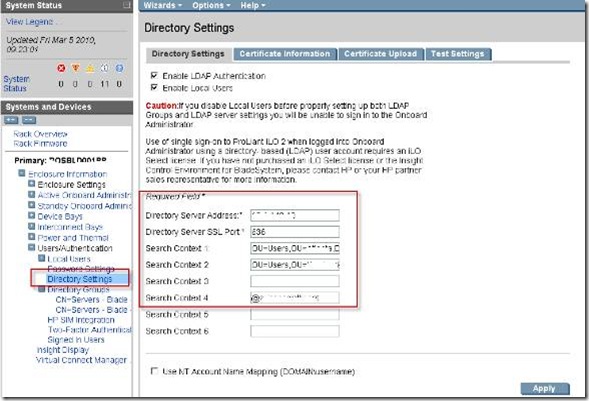
2. Make sure you perform “Directory Settings” as shown below.

A. “ Directory Server Address:* : “ can be any Domain controller IP address.

B. “Directory Server SSL Port:*”  will be fixed 636

C. “Search Context 1: ”  will be in the format of  OU=Users,OU=ABCD,DC=abcd,DC=net

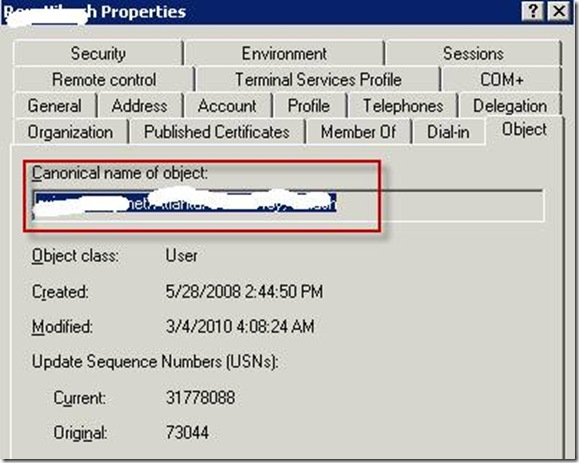
D. One thing to remember is that user from ABC OU can be only able to authenticate. So if you want to user from EFG to be authenticated then either you move the user to ABCD OU or create another “Search Context” with following  OU=Users,OU=EFG ,DC=ABCD,DC=net. The other way to find out field would be looking at user object properties.
clip_image002

clip_image004

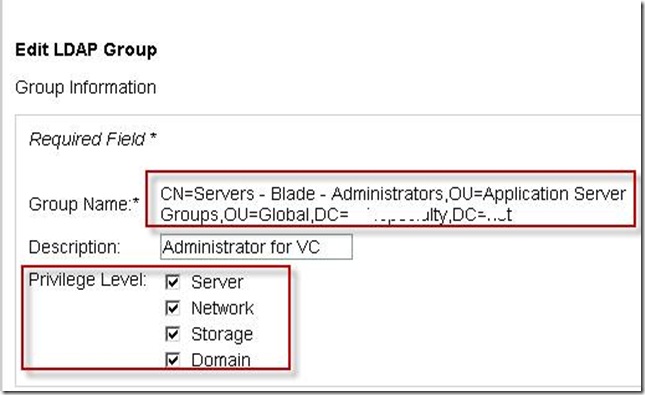
3. We need to create directory group as shown below. Make sure you set the correct privilege level and check correct Device bay for access.

clip_image006

4.. Same setting has been done on VC Manager

clip_image008

and then

clip_image010

Wednesday, March 3, 2010

Working with Blade6:The same network cannot be on multiple Flex-10 ports within the same profile

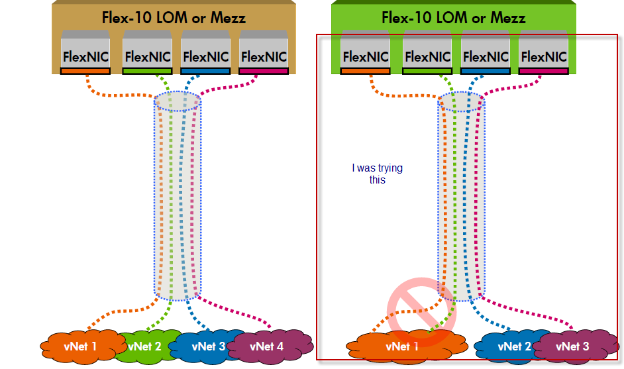
Under your server profile  , you cannot have more than 2 flex 10 NIC dedicated to same network profile. If you tried to assign

If you refer the document on Page 13 ,its clearly mentioned . If you need separate pairs of NICs to go to the same network you can attach additional network cables to the Flex 10 module and configure each uplink port as its own network.

Scenario is like this and I was trying

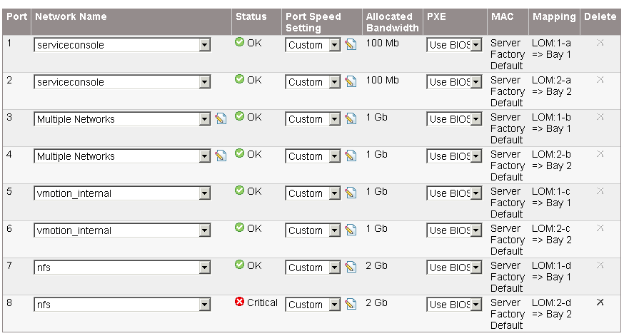
So you have two LOM (Lan on Motherboard ) for each Blade server ,which is also called as Flex NIC. Refering to above figure what we are doing is putting VLAN NFS on LOM1 which as per limitation of Flex 10 is not supported.

I will talk more about Flex 10 NIC architect in my next blog but the document which I mention above is very nice.

Tuesday, March 2, 2010

vSphare : The license Key entered does not have enough capacity for this entity

I was trying to license my vSphare ESX host using my upgrade subscription and I was getting message


I then checked my CPU on my blade server and it has 16CPU

Then I checked my license portal and it was assigned for 2 CPU for two different subscription upgrade.

I combined get to get total of 4 CPU which will be 16 logical CPU .

It will then generate new license Key for 4 CPU

You enter this new Key and then you are good to go

Finally your ESX host is licensed