Tuesday, June 22, 2010

Error with XenServer: SR backend failed to complete the operation

While creating SR on Xen Server 5.5 U2 with backend storage as MD3000i , I was getting following error message

height=

Troubleshooting steps:

1. I unchecked MP option on host and tried again it was able to see all the lun while doing lun scan

height=

2. I then removed the host from pool and tried enabling MP and see if that worked but while scanning the lun it was still throwing same error message

height=

3. Reconfigure all the virtual disk on MD3000i and check all the setting. Finally we found that on one controller if we change the prefer path then I am able to create SR or else it throws error

height=

4. I had other setup with same storage as background. I moved this host into separate pool and checked the MP functionality. With this host I also copied /etc/multipath.conf file from the host which was working . I then restarted multipath /etc/init.d/multipathd restart

This worked great on different pool

5. Finally I updated multipath.conf on all the Xenhost and restarted multipath demon

6. From the controller side I have disabled IP V6 setting on one of the controller which was enabled

height=

Finally with above two changes all the SR had MP enabled

height=

Saturday, June 19, 2010

XenServer: If UI seems stuck or invalid state

The XS API agent/service can be restarted without affecting VMs that are running. This service may need to be restarted after having manually configured host parameters i.e. Management NIC, etc.

•XS Agent runs on top Xen Hypervisor API and XenStore

#service xapi restart

Friday, June 18, 2010

While adding host in XS pool : The hosts in this pool are not homegeneous

I was getting following error while joining XS to the Pool

Went to XECONSOLE and then selected following and it will give you warning

Then it will ask you for pool master IP and root credential . Once supplied it will ask to confirm , F8 to confirm

This will give successful message . Host will appear in correct pool

Thursday, June 17, 2010

Switch to RDP Mode For VM on XenCenter Console is disabled

If you see the VM’s has “Switch to Remote Desktop” grayed as below

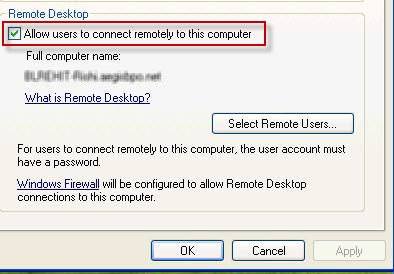
Then Login to OS and disable and enable RDP setting and reboot the VM

If this also does not help then under following location . Delete the folder called “XenCenter”   If none of the above work then uninstall and reinstall XC

Switch to RDP on VM on XC disabled

If you see the VM’s has “Switch to Remote Desktop” grayed as below


Then Login to OS and disable and enable RDP setting and reboot the VM


If this also does not help then under following location


Delete the folder called “XenCenter”


If none of the above work then uninstall and reinstall XC