Saturday, September 24, 2011

How to pre-populate domain name on Desktop Director web page

When you try to access desktop director web page , domain name needs to be typed every time.

image

So in order to pre populate with the domain name open Logon.aspx from following location using  elevated command prompt

image

And made changes at following location

image

And then restart default IIS website


image

You will be doing this all on server where you have installed desktop director and then final result will be something like this

image

Monday, September 5, 2011

Citrix Provisioning Server and Active Directory password management

 Most of you know when we provision vDisk using Citrix PVS (Provisioning Services ), PVS should be allowed to manage the machine account password . The reason in nutshell  : vDisk is created using one master image with machine account in domain . Same image is streamed across multiple machine.

How we do this ? This setting is on PVS server setting

image

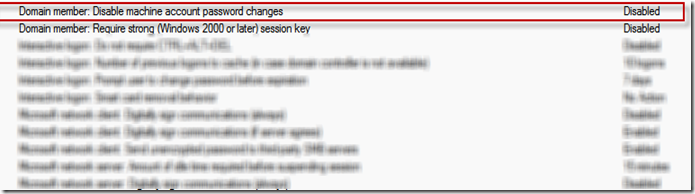
But problem start when you have following default Domain policy

image 

Problem : When machine try to negotiate password after 30 days because of PVS setting AD does not allow to do so. Result of which machine goes out of password synch. This kicks machine out domain and Virtual desktop got unregistered from Desktop Delivery controller

This policy as per Citrix PVS eDocs and also one more eDocs suggest to set this to "Enabled". So how you would like to tackle this situation.

1.  If above setting is not followed with password age then you can define  password age policy and apply to OU which is meant for Virtual Desktop.  As shown below for 999 days PVS will enjoy managing provisioned machine password.

image

2. Windows following Netlogon service tried to negotiate machine password when it expires. This is stored under

image

3.  If the value is set to "0 " then AD will not allow PVS to negotiate password. Remember this is managed by default  domain controller policy but registry can be overwritten by deploying new registry value. How check this out

image

If this policy is applied on OU containing VDI then even default domain policy for password can be overwritten. Citrix has also release fix which address similar issue but not exactly the same issue CTX130273.


Sunday, September 4, 2011

How to disable Printscreen on XA as well as Thin Client

If you would like to disable print screen permanently on XenApp 5.0 /6.0 , this can be done from XA policy as well by creating new registry value as follows:

HKEY_LOCAL_MACHINE -> System -> "CurrentControlSet" -> "Control" -> "KeyboardLayout" create a new binary key called Scancode Map
Value Data will be  :  0000000000000000040000002AE037E0000037E00000540000000000
On linux based thin client WNOS.INI file needs to updated as follows:

1.    xmodmap -e 'keysym Print = anyotherkey'
2.    Comment out the key in /usr/x11r6/lib/x11/xkb/keymap/keycodes

It should be <prsc> = 111 so just put // in front

Following CTX can explain  more about virtual channel

Hope this help

Wednesday, July 27, 2011

Are you ready for Virtualization?


Disclaimer: All views expressed here is mine and my current and past employer not endorse my view.  
Now the buzz word across IT world is Go Green  / Cloud computing /Go virtual /Green Computing. Everyone likes to use this word for various reasons but the million dollar questions 
  1. Is your organization ready for it?
  2. Is this being forced by your management?
  3. Is your support function / Infrastructure ready to take up new challenges?
  4. Corporate users also want to use same slogan (Go Green… etc.) ?
  5. Does solution provider understand your requirement?

We will try to acknowledge  and outline some key points which is required to implement “Go Virtual”. 
Corporate would like to implement “Go Green” mantra. They want to do it because their competitors have implemented it. They implement it because they want to establish capability proposition for their clients/customer “We are at par with latest IT trend”. There are very few who really understand that it is not just the mantra but also a social obligation. By saving electricity and reducing e-waste, IT world will be repaying to society.
To answer 1st question: Are you really ready for this change? This question should be asked to each individual in an IT organization. Go Green bring huge change inside the organization. It does not only bring changes to your support model but as an end user it is required a mind set to accept change.
Answer for 2nd question; 
When management pass the bucks to their colleagues to sing “Go Green ” mantra they should take everyone into confidence. Management should also educate themselves about “Go Green” mantra before they expect their colleagues to follow. Such initiative comes from top or from middle tier. So how does this tier react with such initiative? 
For  example if these initiative comes from middle tier, most of the time it has influence from lower middle technical mindset who want to test few product and showcase their capabilities to their manager. Such sections of people do it 
a) To learn and upgrade their skill for the know reason.
b) Influence by some vested interest to test certain feature. Major drawback with this approach is business direction, as these sections mostly lack such skill. Resulting in the  bad investment. 
If the initiative is business driven then it requires involvement of every layer of the organization, starting from the individual who will be conducting POC to the individual  who would perform TCO . Most of the time such initiative are driven by business goal. Hence this goes through cycle of choosing the right product to right hardware and deploying right solution so that you can see expected TCO. 
In usual world Organization   send out the requirement to multiple vendors offering VDI solution. Vendor perform POC, showcase the capabilities and get management confirmation. Management then compares the available solutions along with the costing. Costing is the other deciding factor for choosing product and in my view it is a correct approach. In my experience, middle tier or lower middle tier always like to go with selective approach for various reason. These reasons can be either their personal interest or personal comfort level. Say for example if I am asked to work on Dell or IBM blade, I may not be   comfortable as I am on HP. Having said I should not tell management as well as management should not take this suggestion for granted. 
To conclude this post:
While choosing VDI solution for your organization we should follow these:
  1. Choose correct VDI solution which suits your requirement. 
  2. Choose correct hardware to implement these VDI solutions.
  3. Training support folks on these technologies are key to make VDI implementation successful.  
  4. Handling end user expectation is other key to success. 
  5. Organization goal above individual goals. 
Hope this read is been useful and help to answer and understand few of your query

Monday, July 18, 2011

Outlook 2010 PST is supported over network share with VHD and Hosted Shared desktop

I have discussed in the past about deploying how to deploy desktop using flexcast model. Now major application is email client outlook. When we talked about outlook then we should also talk about PST and OST. Exchange has limited mailbox size and IT policy expects you to maintain your own PST . There is also archiving or backup solution.


In such situation you are provided with home drive where you have to dump PST . Since you are on VHD (VM hosted desktop ) or HSD (Hosted Shared desktop ) , you have to provide this home drive either via DFS/CIFS. In either situation you will be storing PST or OST over network. Most of the time people have a question and also knows the answer : PST is not supported over network share. This answer comes from following article directly or indirectly from Microsoft .

1. From Askperf team (Let me admit , I am the biggest fan of this blog)

http://blogs.technet.com/askperf/archive/2007/01/21/network-stored-pst-files-don-t-do-it.aspx

2. Microsoft KB

http://support.microsoft.com/kb/297019/

After reading above you will sure that you will be start hunting for alternate solutions like increasing mailbox size/Mail archiving solution or providing locally attach storage to each users so that they can store PST minus network and get MS support it.

But let me tell Microsoft following KB’s has something else to say:

http://www.microsoft.com/downloads/en/details.aspx?displaylang=en&FamilyID=776e5d50-d35a-483a-a3e5-99944f4bae42

http://support.microsoft.com/kb/297019  .

In middle of this article it says

Outlook 2010 hosted remotely by using Windows Server 2008 R2 Remote Desktop Session Host (RDSH) or Virtual Desktop Infrastructure (VDI) configuration

Network access of .pst and .ost files is a supported scenario in Outlook 2010 if the following conditions are true:

• A high bandwidth/low latency network connection is used.

• There is single client access per file (one Outlook client per .pst).

• Windows Server 2008 R2 Remote Desktop Session Host (RDSH) and Virtual Desktop Infrastructure (VDI) are used.

Network scalability guidance that is specific to this configuration can be found in the "Cached Exchange Mode in a Remote Desktop Session Host environment: planning considerations (Outlook 2010)" white paper. Although this document specifically refers to Exchange Cached Mode, the scalability metrics should also apply to other Outlook configurations, assuming the criteria that are mentioned in the preceding list are met.

Yes you heard correctly PST is supported on network share if you meet above three criteria.