Thursday, October 20, 2011

How to enable DesktopViewer for Citrix Webinterface and PNA site.

Sometime desktop viewer is not available when it is launch via WebInterface . This can be made enabled via changing WebInterface.conf

image

This file will exist under each of the site which is created under IIS

image

Edit the file and remove the # and make it Off to ON

clip_image001

Wednesday, October 19, 2011

How to hide SEP (Symantec) notification for published XenApp application

When application is published from windows 2008 R2 machine having Symantec Endpoint Protection running , it shows up under connection center .

clip_image002[4]

If you have multiple application there would be many such notification under connection center . In order to suppress it , GPO can be used to populate . These value can be found under  CTX101644

clip_image002[6]

After a registry deployment these notification will be disappear .

clip_image002[8]

Saturday, October 15, 2011

How to Hide selective drive for XenApp 6 or XenDesktop

There are many ways people go for hiding selective drives and hiding drives. I have tried creating ADM but does not looks to be a viable option .

The "NoDrives" value uses a 32-bit word to define local and network drive visibility for each logical drive in the computer. The lower 26 bits of the 32-bit word correspond to drive letters A through Z. Drives are visible when set to 0 and hidden when set to 1.

There are two registry entry which can make this happen

User Key: [HKEY_CURRENT_USER\Software\Microsoft\Windows\CurrentVersion\Policies\Explorer]
System Key: [HKEY_LOCAL_MACHINE\Software\Microsoft\Windows\CurrentVersion\Policies\Explorer]
Value Name: NoDrives
Data Type: REG_DWORD (DWORD Value)

To determine the value, you need to do some little math

The "NoDrives" value uses a 32-bit word to define local and network drive visibility for each logical drive in the computer. The lower 26 bits of the 32-bit word correspond to drive letters A through Z. Drives are visible when set to 0 and hidden when set to 1.

If you are not happy working in Hex, add these decimal numbers to hide the drive(s):

A: 1, B: 2, C: 4, D: 8, E: 16, F: 32, G: 64, H: 128, I: 256, J: 512, K: 1024, L: 2048, M: 4096, N: 8192, O: 16384, P: 32768, Q: 65536, R: 131072, S: 262144, T: 524288, U: 1048576, V: 2097152, W: 4194304, X: 8388608, Y: 16777216, Z: 33554432, ALL: 67108863

For example to hide drive A and drive D, you would add 1 (A) + 8 (D) which means the value should be set to "9".

To disable all the drives set the value to "67108863".

Now say you just want to show H drives to the user and hide rest of them then

All value =67108863 H: = 128 . Just to show H drive =67108863-128=67108735

The value for "NoDrives"= 67108735

To deploy this using GPO you need to do following setting under GPO,

This example is to show all except H: drive on XA box.

image

Saturday, September 24, 2011

How to pre-populate domain name on Desktop Director web page

When you try to access desktop director web page , domain name needs to be typed every time.

image

So in order to pre populate with the domain name open Logon.aspx from following location using  elevated command prompt

image

And made changes at following location

image

And then restart default IIS website


image

You will be doing this all on server where you have installed desktop director and then final result will be something like this

image

Monday, September 5, 2011

Citrix Provisioning Server and Active Directory password management

 Most of you know when we provision vDisk using Citrix PVS (Provisioning Services ), PVS should be allowed to manage the machine account password . The reason in nutshell  : vDisk is created using one master image with machine account in domain . Same image is streamed across multiple machine.

How we do this ? This setting is on PVS server setting

image

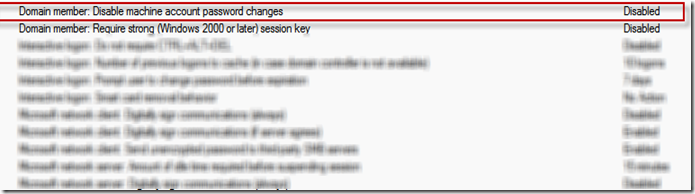
But problem start when you have following default Domain policy

image 

Problem : When machine try to negotiate password after 30 days because of PVS setting AD does not allow to do so. Result of which machine goes out of password synch. This kicks machine out domain and Virtual desktop got unregistered from Desktop Delivery controller

This policy as per Citrix PVS eDocs and also one more eDocs suggest to set this to "Enabled". So how you would like to tackle this situation.

1.  If above setting is not followed with password age then you can define  password age policy and apply to OU which is meant for Virtual Desktop.  As shown below for 999 days PVS will enjoy managing provisioned machine password.

image

2. Windows following Netlogon service tried to negotiate machine password when it expires. This is stored under

image

3.  If the value is set to "0 " then AD will not allow PVS to negotiate password. Remember this is managed by default  domain controller policy but registry can be overwritten by deploying new registry value. How check this out

image

If this policy is applied on OU containing VDI then even default domain policy for password can be overwritten. Citrix has also release fix which address similar issue but not exactly the same issue CTX130273.