Thursday, September 13, 2012

Citrix Personal vDisk (565) dynamic expansion

Citrix has released latest version of PVD (Personal vDisk ) 565 which support dynamic expansion . What does it mean to you? Say you have created PVD of 10GB and for some reason you ran out of space

image

Space distribution is shown below

image

Now lets expand this P: drive from 10GB  to 15GB

image

And this is how space distribution changes

image 

Now say C: drive is full

image

Reboot  the VM and C: drive is expanded automatically

image 

This has been explained here

XenApp shadowing does not logoff user session

When helpdesk team close the shadowing session ICA shadowing session does not logoff from the server. Because of this reason no more shadowing will be allowed on this server by same users. Let's find out how does it happen . I am shadowing "citrix.test" using user "citrix.test" . This is what shown under App control center

image

When this session is terminated via Ctrl+ *
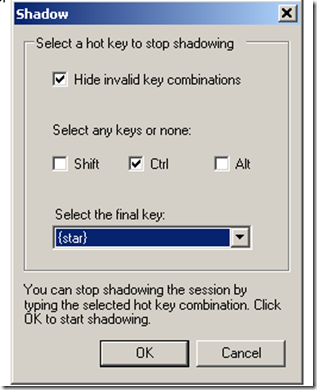
image

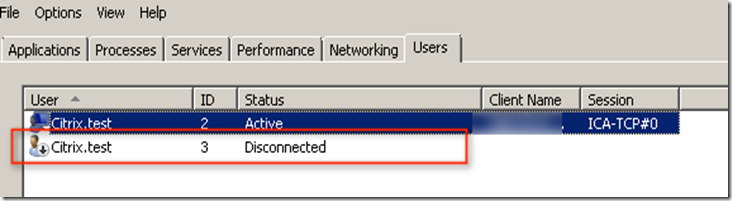
This will still be shown under App Center as disconnected

image

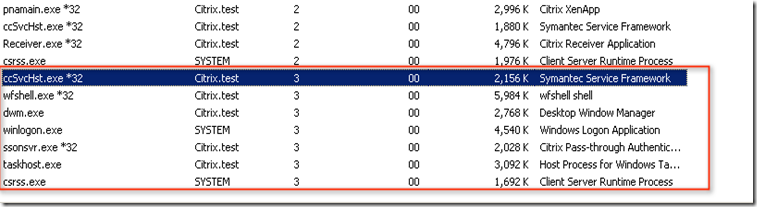
This disconnected session does not logoff  shadowing session gracefully. After looking at task manager it has been found that couple of process which was still running with PID
image

we were not able to kill Symantec Service Framework service even using local admin or domain admin
image

Created GPO and deliver following key using "Create" option

HKEY_LOCAL_MACHINE\SYSTEM\CurrentControlSet\Control\Citrix\wfshell\TWI

Value Name:LogoffCheckSysModules
Type:
REG_SZ
String: ccSvcHst.exe

image

as explained in CTX891671. After this registry changes Ctrl + * use to close the shadowing session.

How to set alias for Desktop Director URL

When desktop director is installed , it can be accessed via http://<server name >/Desktopdirector  . But DNS will not allow you to create alias , so you will be always need to type http://<server name >/Desktopdirector  . In order to get access via just server ie.  http://<Servername> we need to make change in IIS or create Default.htm file under wwwroot folder. Content of Default.htm will be  
Other way of doing is to redirect http request from http://<servername>/desktopdirector to http://<servername> from IIS
image

Friday, September 7, 2012

ClientName variable as hostname via Citrix AGEE

When hosted desktop is launch via AGEE it display the host name with something like WI_  . This makes some of the application behave weird which uses this variable. Mainly some CRM application which uses this hostname . This can be verified via running set command.

image 

To fix this small change on WI can help . Uncheck the below options

image

And after that when application like hosted shared desktop is launched it display the correct CLIENTNAME="workstationname"

image

Tuesday, August 28, 2012

How to manage XenApp 6.5 and XenDesktop 5.x using Desktop Director 2.1

Last time I wrote a blog and refer to blog by Dane Yong  http://blog.itvce.com/?p=408  for installing  DD which can integrate both XA and XD.  After that I tried following again and it never worked. There are several other blogs which says how to integrate XA6.5 and XD5.6 together. They also mention to use different ISO but here is what you need to do

  1. In this example we are using dedicated DD which does not have any other component.
  2. Mount XenDesktop 5.6 ISO image to the machine  and run Autorun.exe -> Install XenDesktop option -> deselect all options except Desktop Director
  3. On the bottom of the page where Desktop Director is selected, an input box will appear asking you to enter a controller in the XenDesktop site commence installation

                 image   

     4.   Open Internet Explorer – open the Desktop Director site, confirm XenDesktop site is enumerated successfully

     5.      Run IIS Manager, open the Application Settings for the DesktopDirector folder. Add the

                Service.AutoDiscoveryAddressesXA option with relevant XA server

image

6.  Open Internet Explorer and log in to the Desktop Director site again. Confirm that XenDesktop is enumerated successfully

      on the main landing page and that searching for a user shows their XenApp sessions too

image

You can reach out incase you are not able to make it work :P
