Friday, December 28, 2012

Shadowing across firewall

While doing shadowing across firewall by default people guess 1494/2598 but that is not the case. Shadowing is tested RPD over RDP /RDP over ICA and both have different result. 

image

We captured wireshark trace and found that 139 and 445 which is not responding to send sync.

image

Once we opened above port shadowing started working. So for shadowing to work across firewall we need to open port 139/445/1494/2598

image

Thursday, December 27, 2012

Integrating VOIP 1: What would be best Citrix policy for SoftPhone

I had been testing softphone for a while now and was trying to find out what would be best Citrix policies for these softphone. I will be writing couple of series with regard to softphone, hence bear with me please :) .

We have tested following softphone on Virtual Hosted Desktop (VHD) and the mostly because of Call center manager setup which most of the organization have. Most organization uses MAC based extension registration and what does it mean in terms of virtualization, say if you are using Hosted Shared Desktop (XenApp) then it won't be possible to host softphone on XA. Even it is IP based extension registration it can be managed because Windows 2008 R2 allows you to have virtual IP . This changes are very difficult for voice team hence hosting such VOIP based application on XA does not work.

Soft Phone which we have tested so far

1.    Nortel
2.    Avaya
3.    Cisco
4.    Genesys
5.    CosmoDesk

All of them worked perfectly fine with Windows 7 as well as XP . Voice quality was perfect and close to that of physical desktop. To get the result  following set of  standard  XD policies had been used

image

Other then these policies many other factor contribute to this voice quality and some of them are

1. End device thin client /thick client

2. Receiver version used

3. End device operating system.

4. Headset used.

5. Voice codec used.

I will discuss some of the factor in my next posting. Till then thank you

Tuesday, November 27, 2012

Disk Size cannot be alter as it is used by running VM

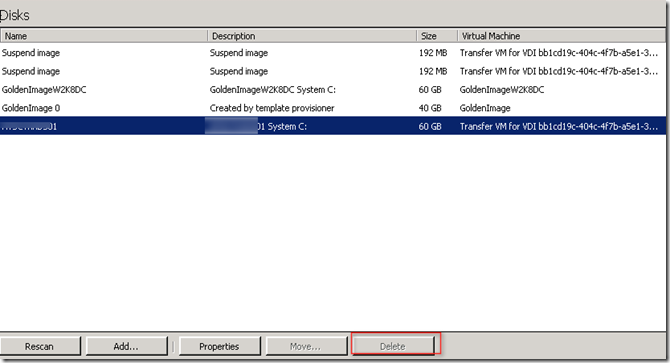
We had an issue where VM were deleted but VHD where not able to delete . Button were grayed out

image

Virtual disk properties shows that it has two read only disk

image

Also VHD properties had following message "Disk size cannot be altered as the disk is already being updated or is in use by running VM

image

Finally to remove this we had enabled hidden object under view

image 

Those two read only disk can be stopped now and also can be deleted image

Friday, September 14, 2012

This operation can not be performed because the specific virtual disk could not be found

You will get the error message while starting the VM on XenServer "This operation can not be performed because the specific virtual disk could not be found"

image

After ejecting the mounted ISO VM booted normally

image

Thursday, September 13, 2012

Citrix Personal vDisk (565) dynamic expansion

Citrix has released latest version of PVD (Personal vDisk ) 565 which support dynamic expansion . What does it mean to you? Say you have created PVD of 10GB and for some reason you ran out of space

image

Space distribution is shown below

image

Now lets expand this P: drive from 10GB  to 15GB

image

And this is how space distribution changes

image 

Now say C: drive is full

image

Reboot  the VM and C: drive is expanded automatically

image 

This has been explained here