Sunday, January 27, 2013

Comparison of Flash Redirection with XenDesktop

I had been hearing that flash redirection does not work  and many tried to prove it via their own videos or what ever mean they had, so I thought why should I left behind :).
I used my laptop running MacBook Pro with HP Windows 7 based thin client running XenDesktop 5.6. Thin client were running windows receiver3.3.  I choose virtual tour of Marina Bay Sands hotel Singapore
image

So first I choose to record a situation which have do not flash redirection enabled. And check this video for it


Now what happen when Flash redirection work can you find any difference with virtual tour , no yes ? Yeah one is MAC screen and other one is HP thin client screen . Other than that any difference ? O wait I forget to add one more thing, this flash display is over 300ms + of latency.I know you have many questions regarding setting and stuff like that. Drop me a note and we can discuss this.


Thursday, January 3, 2013

Cisco IP Communicator (CIPC) Network Tab grayed on PVS streamed Virtual Machine

When CIPC is launched on PVS streamed windows 7 virtual machine , the network tab is grayed out.

clip_image002

It has been found that if anything below CIPC 8.6 is used have known behavior. It need to be insure that correct version of CIPC  need to be used

If  8.6 is used

clip_image002[6] 

then network option is available for editing

clip_image002[8]

Friday, December 28, 2012

Shadowing across firewall

While doing shadowing across firewall by default people guess 1494/2598 but that is not the case. Shadowing is tested RPD over RDP /RDP over ICA and both have different result. 

image

We captured wireshark trace and found that 139 and 445 which is not responding to send sync.

image

Once we opened above port shadowing started working. So for shadowing to work across firewall we need to open port 139/445/1494/2598

image

Thursday, December 27, 2012

Integrating VOIP 1: What would be best Citrix policy for SoftPhone

I had been testing softphone for a while now and was trying to find out what would be best Citrix policies for these softphone. I will be writing couple of series with regard to softphone, hence bear with me please :) .

We have tested following softphone on Virtual Hosted Desktop (VHD) and the mostly because of Call center manager setup which most of the organization have. Most organization uses MAC based extension registration and what does it mean in terms of virtualization, say if you are using Hosted Shared Desktop (XenApp) then it won't be possible to host softphone on XA. Even it is IP based extension registration it can be managed because Windows 2008 R2 allows you to have virtual IP . This changes are very difficult for voice team hence hosting such VOIP based application on XA does not work.

Soft Phone which we have tested so far

1.    Nortel
2.    Avaya
3.    Cisco
4.    Genesys
5.    CosmoDesk

All of them worked perfectly fine with Windows 7 as well as XP . Voice quality was perfect and close to that of physical desktop. To get the result  following set of  standard  XD policies had been used

image

Other then these policies many other factor contribute to this voice quality and some of them are

1. End device thin client /thick client

2. Receiver version used

3. End device operating system.

4. Headset used.

5. Voice codec used.

I will discuss some of the factor in my next posting. Till then thank you

Tuesday, November 27, 2012

Disk Size cannot be alter as it is used by running VM

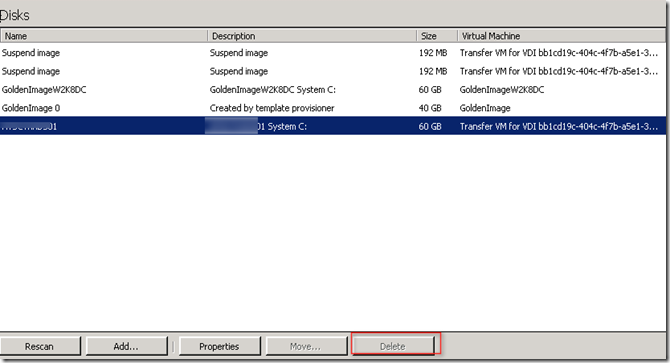
We had an issue where VM were deleted but VHD where not able to delete . Button were grayed out

image

Virtual disk properties shows that it has two read only disk

image

Also VHD properties had following message "Disk size cannot be altered as the disk is already being updated or is in use by running VM

image

Finally to remove this we had enabled hidden object under view

image 

Those two read only disk can be stopped now and also can be deleted image