Wednesday, February 15, 2012

How to Change Desktop Dirctor Dashboard Display

Desktop Director by default display only five count for display of Catalogs and Desktop Groups. 

image 

To change this display we need to make changes on IIS setting on Desktop Director server . This is located under Application setting of DesktopDirector website as shown below

image

After this change reset the IIS.  After this change Desktop Director display  10 setting. image

Monday, February 6, 2012

How to shut down arrogant VM on XenServer

Sometime VM hang and restarting xapi and toolstack  will not  help . There is a good way of doing this , oh yeah

1. Run xe vm-list and in this case INBLREHVDI0007 is the VM which says running image

2. Run list_domains command and find out domain ID . In this case it is 246.image

3. Destroy the domain using . This will sit as usual but press control + c and come out of the prompt.image

4. Run list_domains and check the domain ID has been changed.image

5. Reboot the VM and it will work perfectly .

image

Source is here

Saturday, January 21, 2012

How to monitor XenDesktop VDA registration Event ID's using EdgeSight

By default EdgeSight  provide template to monitor VDA event ID which is for XD 4.0

image

Detail of this template point to the event ID which is meant for XD 4.0

image 

So in order to monitor VDA 5.0 registration failure with DDC we need to create custom alert and update database with this event ID .

image

Select system Alerts in the below screen.

 image

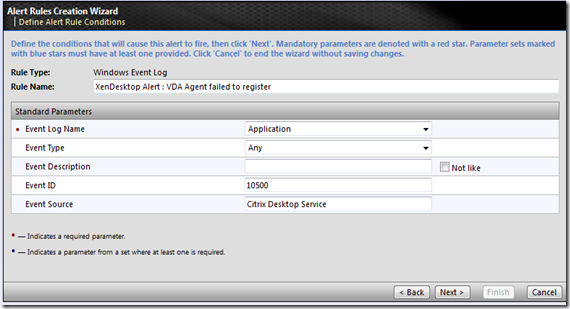
Select the windows event log on the next screen in order to define the event ID.

image

Here define the event ID 10500 and event source as Citrix Desktop Service
image

Here click on next to assign to the desktop site.

image

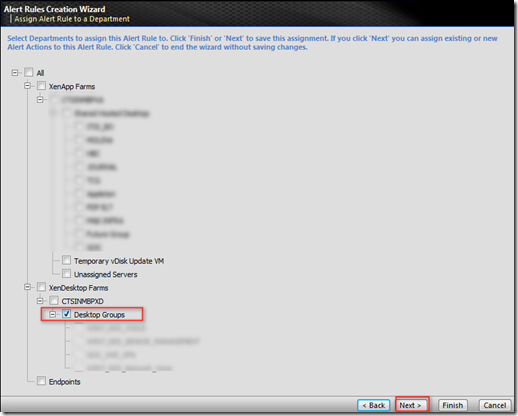
Here choose which desktop groups you need to apply this template to.

image

Here again choose and select desktop group .
image

Here choose to create the new alert action

image

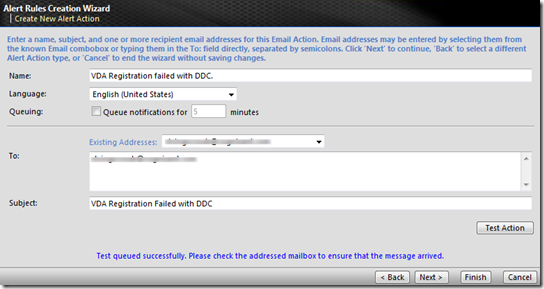
Here select email as the notification mechanism.

image

Here choose the alert email recipient and the subject line. Click finish to come out of the loop.
image

Now we need to make changes to SQL to accept this event ID. Open the ES database and run the SQL queries

select * from alert_config  . This will list the alertconfigid, choose the highest one. In my case it is 20

image

Now check the existing data which has been updated.

Select * from alert_config_value where alertconfigID=20image

Now we have to database with more event id

update alert_config_value set key_value = '10501,10502,10508' where key_name='EventID' and alertconfigid=20

Rerun the select query  Select * from alert_config_value where alertconfigID=20

to confirm if the other event ID is updated.

Monday, January 16, 2012

How to display more line item on Desktop Director DashBoard.

Quite confusing from the title of the blog , isn't it ? Well this has been a normal situation when dashboard is launched only 5 desktop group status will be shown on the dashboard as shown below.image

This can be modified by changing IIS attribute of DesktopDirector application settings as shown below.

clip_image002

Friday, December 9, 2011

How to install Lotus SameTime 8.5.1 on Citrix PVS Streamed pooled desktop (VDI)

IBM Lotus Sametime is the enterprise communicator similar to OCS. It has similar feature as Microsoft OCA along with , it has ability to take screenshot and share over chat . Some of the cool feature liked by end users to  have his/her  own emotions on chat.

While installation is easy but it does not launch in PVS streamed VM's . PVS streamed VM  uses roaming profile because of pooled environment . This can only be achieved via storing user's profile data on shared storage.

IBM Sametime does not like it because it has tendency to store it locally . Below screenshot shows that  value called rcp.data store it locally. This setting does not allow the sametime to launch when desktop is access via ICA session.image

To make it work , mount the roaming app data GPO by updating registry

image

And now make change to the file rcplauncher.properties by updating the field called rcp.data as shown below .

image

With this you would be able to launch IBM same time on streamed pooled VM.
