Friday, June 29, 2012

Unable to connect to the management console after PVS 6.1 config was successful

I was trying to configure PVS6.1 setup on windows 2008R2, configuration went successful but I tried to connect to server using console got following error : Event ID 11 Cannot establish a connection to the database because the server cannot be found
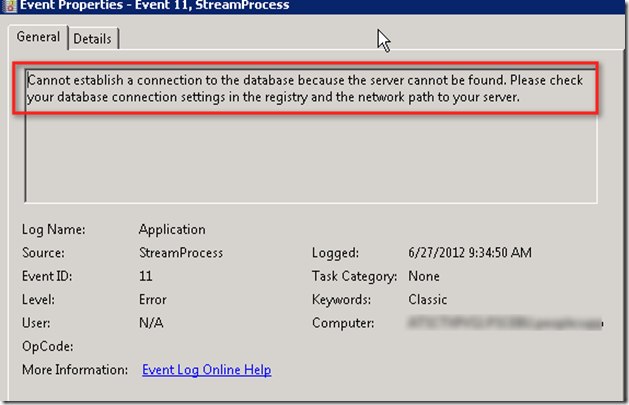
image

When the PVS config wizard run it usually populate registry with  the database info in encrypted format. But in my case this was missing

clip_image002

I checked the CTX129060 and policy was applied as mention

clip_image002[6]

We captured processmon and it has some info

image

Following CTX129161 explain to change value to 1 but we had this value , what we did changed to 0 and that worked for us

clip_image002[8]

Monday, June 11, 2012

How to change AGEE login page widget and remove Fileshare tab

When login to AGEE with NS version 9.3 , you will see screen like shown below. Sometime customer don't want to show File Share tab as well as shrink this widget .

image

This has been documented in CTX120643 but it mention some wrong line number for NS build 9.3. For NS build 9.3 change the following under homepage.html file at /netscaler/portal/template/homepage.html. Add as suggested in CTX120643 and shown below at like 602.

image

Once this is done you also need to rearrange the block for that make the changes in same line at line number 567 to the value

image

Save this setting as discussed in CTX12643

image

Now the page will look like this

image

Friday, June 8, 2012

What new with HDX Monitor 2.X for XenDesktop

If anyone have used HDX monitor 1.x will surely understand what I am talking about. HDX monitor was designed to provide ICA session information. Earlier version does not use to allow to launch for non ICA session .

image

With HDX 2.x you can lunch even without ICA session . This also allow you to connect to any other machine

image 

Once connected following information is can be gathered under non ICA session . You can see all the star info . This also allow you to generate report

image

All the threshold can be tweaked by changing setting

image 

When you look via ICA session check this beautiful report :)

image 

Now if this is launched via XA session , you can see all the session from single ICA window

image

Something to fall in love with

Thursday, June 7, 2012

How to Disable Shift F2 for Citrix published desktop (HSD)

When XenApp desktop (Hosted Shared desktop ) is published user can use Shift +F2 to minimize the desktop . Below test is with  XenApp 6.5 and webinterface 5.4 along with Citrix receiver 3.2. To disable this completely we have to make changes to defult.ica and webinterface.conf for particular site as shown below.

image

Wednesday, June 6, 2012

Avaya CMS Supervisor Error <429> with XenApp 6.5

When Avaya CMS supervisor used to be launch within XA hosted desktop error used to throw <429?

image

This require specific permission per forum. Create folder C:\Program Files\Avaya if this does not exit .  Give authenticated users full control on the folder:

C:\Program Files\Avaya  and C:\Program Files (x86)\Avaya.

image

Now Avaya CMS is launching fine

image
